


Introduction
Hello, dear readers!
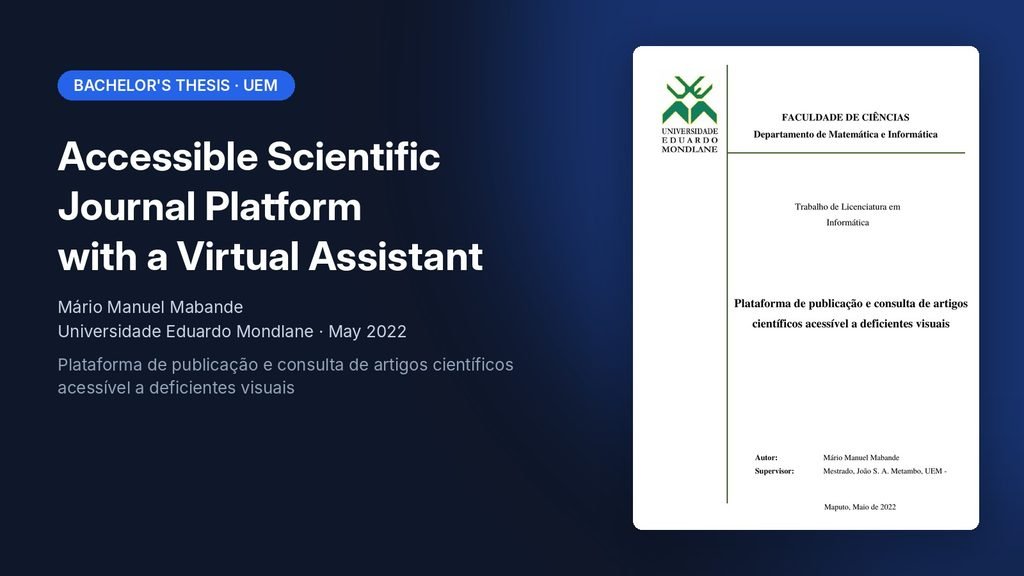
Today I want to share the research behind my bachelor’s thesis in Informatics at Universidade Eduardo Mondlane (UEM), completed in May 2022.
The idea was born in the Biblioteca Brazão Mazula, at UEM. There I noticed something I could not forget. Students with visual impairments depended almost completely on other people to study. A colleague, a lecturer, or a library staff member would guide them to the library, find the books for them, and often read those books aloud.
The digital world should have been the way out. Scientific articles are now published online, available 24 hours a day. But most websites are built for people who can see the screen. So the same barrier that existed on the library shelf moved to the browser.
That question became my thesis: can we build a platform for publishing and reading scientific articles that a visually impaired person can actually use?
The answer was O Conhecimento, a scientific journal platform, together with Malesta, a virtual assistant that describes the website to the visitor by voice or text.
Index
- The Problem: An Internet That Is Not Built for Everyone
- Listening First: What the Interviews Taught Me
- The Rulebook: WCAG 2.1 in Four Principles
- The Solution: O Conhecimento
- Meet Malesta, the Virtual Assistant
- Under the Hood: Stack and Methodology
- Testing: What the Users Said
- Looking Back from 2026: Limitations and Malesta 2.0
- Conclusion
- Acknowledgements
- Read the Full Thesis
- References
1. The Problem: An Internet That Is Not Built for Everyone
Numbers first, because they show the size of the problem.
According to the 2017 census of Mozambique’s Instituto Nacional de Estatística (INE), the country had around 90,000 people with visual impairments. Some of them are students. In the same census, around 91,049 people had attended higher education (INE, 2017). University students build their work on articles, theses, and dissertations, and almost all of these now live online.
Now look at the websites they would need to use. In February 2021, the Fórum das Associações Moçambicanas de Pessoas com Deficiência (FAMOD) and Data4Change audited 90 Mozambican websites, including government, shopping, and news sites. They found more than 700,000 accessibility violations, an average of 38 violations per unique page (FAMOD & Data4Change, 2021).
What does a “violation” mean in practice? An image with no description, so the screen reader says nothing. A button that only works with a mouse. A page with no headings, so a blind user cannot jump between sections. For someone using a screen reader, each one of these is a closed door.
There is a second, quieter problem. Even when a site is technically readable, a visually impaired visitor cannot see its layout. Where is the menu? How many pages exist? What is on this page before I start reading it line by line? A sighted user answers these questions in two seconds with a glance. A blind user has to discover them slowly, element by element.
This second problem is the one my virtual assistant was designed to solve.
2. Listening First: What the Interviews Taught Me
Before writing a single line of code, I needed to understand two worlds: how scientific articles are published, and how a visually impaired person actually uses a computer. So I ran two semi-structured interviews.
2.1 How a scientific journal works
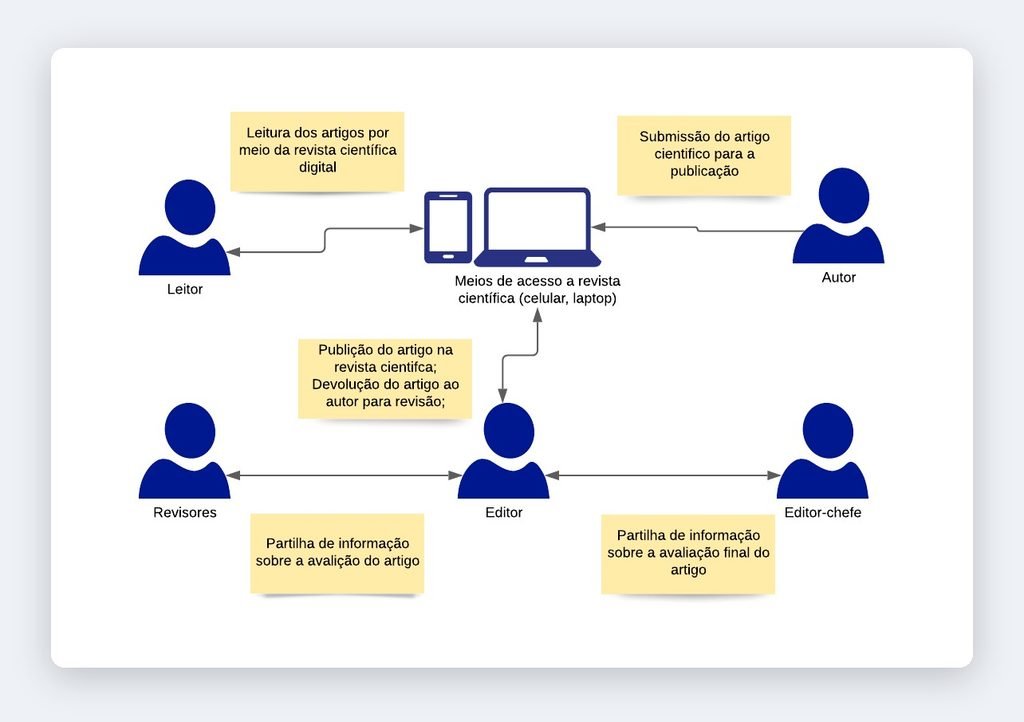
I interviewed Prof. Doutora Aidate Mussagy, Editor-in-Chief of the Unidade Editorial da Revista Científica da UEM. She explained the full journey of an article, from submission to publication:
- The author submits the article.
- The editor receives it first and sends it to the reviewers.
- The reviewers check whether the topic is current, whether it follows the journal’s standards, and whether the quality is sufficient, using a review form.
- If the review is positive, the editor-in-chief makes the final decision. The editor then handles proofreading and electronic layout before publication.
At the time, the UEM journal managed this process with Open Journal Systems (OJS). On inclusion, she pointed to the Braille room at the Biblioteca Central Brazão Mazula, which supports people with special needs. This interview gave me the actors of my system: author, editor, editor-in-chief, and reader.
2.2 How a blind user experiences the web
The second interview was the most important one for me. I spoke with Prof. José Chilaule, a member of the Associação dos Cegos e Amblíopes de Moçambique, who is himself visually impaired.
His requirements were simple and very clear. Paraphrasing his words:
- Keep it simple. The platform must not be difficult to navigate.
- Make it keyboard-friendly. A user must be able to move around with the arrow keys.
- Let the platform explain itself. It should describe how to navigate it, what it is about, and how it is structured.
That third point changed my project. Following accessibility rules was necessary but not enough. The platform also needed a guide: something the visitor could ask. That is how Malesta was born.
3. The Rulebook: WCAG 2.1 in Four Principles
Web accessibility has an official rulebook: the Web Content Accessibility Guidelines (WCAG) 2.1, published by the World Wide Web Consortium (W3C). The W3C describes web accessibility as making the web usable by people with disabilities: they must be able to perceive, understand, navigate, and interact with it, and also contribute content to it (W3C, 2018).
WCAG covers many kinds of disability: visual, auditory, physical, speech, cognitive, language, learning, and neurological. All its guidelines are organised under four principles, easy to remember by the acronym POUR:
| Principle | What it means | Example in O Conhecimento |
|---|---|---|
| Perceivable | Users must be able to perceive the information presented | Malesta can read page descriptions aloud, not only show them |
| Operable | Users must be able to operate the interface | Keyboard shortcuts open the assistant without a mouse |
| Understandable | Information and operation must be understandable | Every page follows the same simple layout: header, content, assistant |
| Robust | Content must work with many user agents, including assistive technologies | Standard HTML that screen readers can interpret |
If any of these four fails, a person with a disability simply cannot use the site. O Conhecimento was developed with these four principles as a requirement, not as a decoration added at the end.
4. The Solution: O Conhecimento
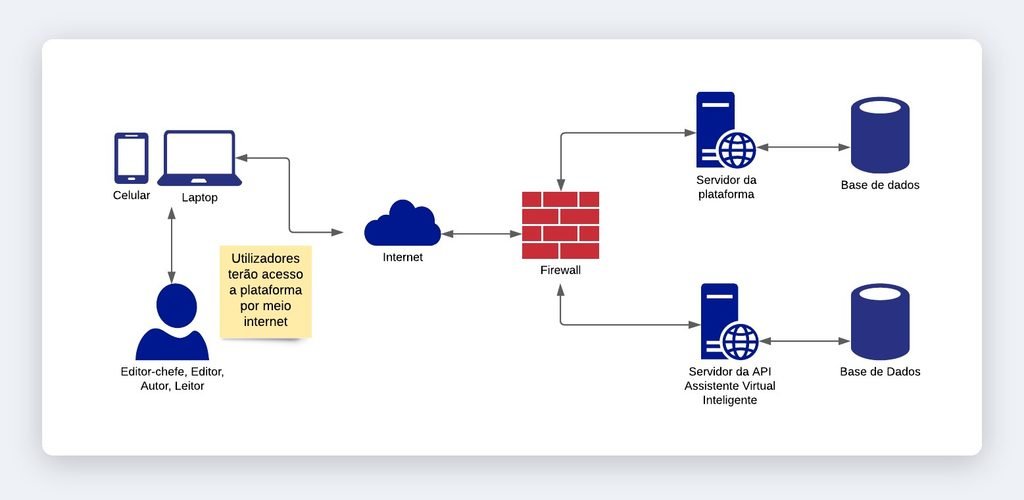
The proposed system has two parts that work together:
- O Conhecimento, a web platform to publish and read scientific articles.
- Malesta, a virtual assistant built as a separate API, which knows the structure of the website and describes it to visitors.
Why separate them? Because the assistant is not specific to scientific journals. Any website (sports, entertainment, health) can register its pages in the API and give its visitors the same help. Keeping it independent made it reusable.
4.1 Who uses the platform
| Actor | What they can do |
|---|---|
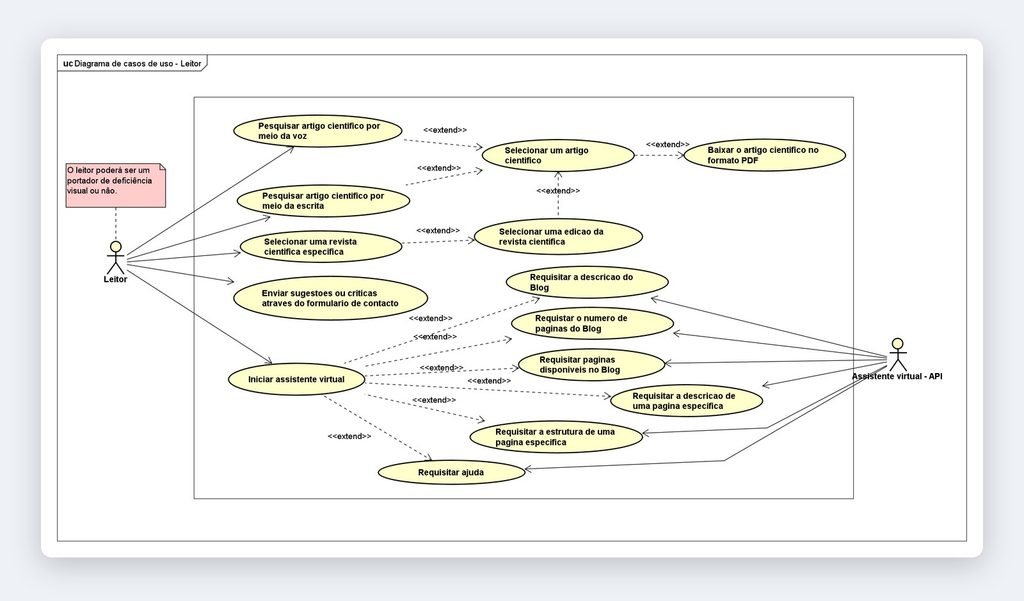
| Reader | Search articles by voice or text, browse journals and editions, download articles as PDF, use the assistant |
| Author | Register keywords, submit articles, edit submissions, follow their status |
| Editor | Create journals and editions, approve or reject articles, publish editions |
| Editor-in-chief | Everything the editor does, plus manage users and configure the assistant |
The reader is the centre of the project. The reader may or may not be visually impaired, and the platform must serve both equally.
4.2 How the content is organised
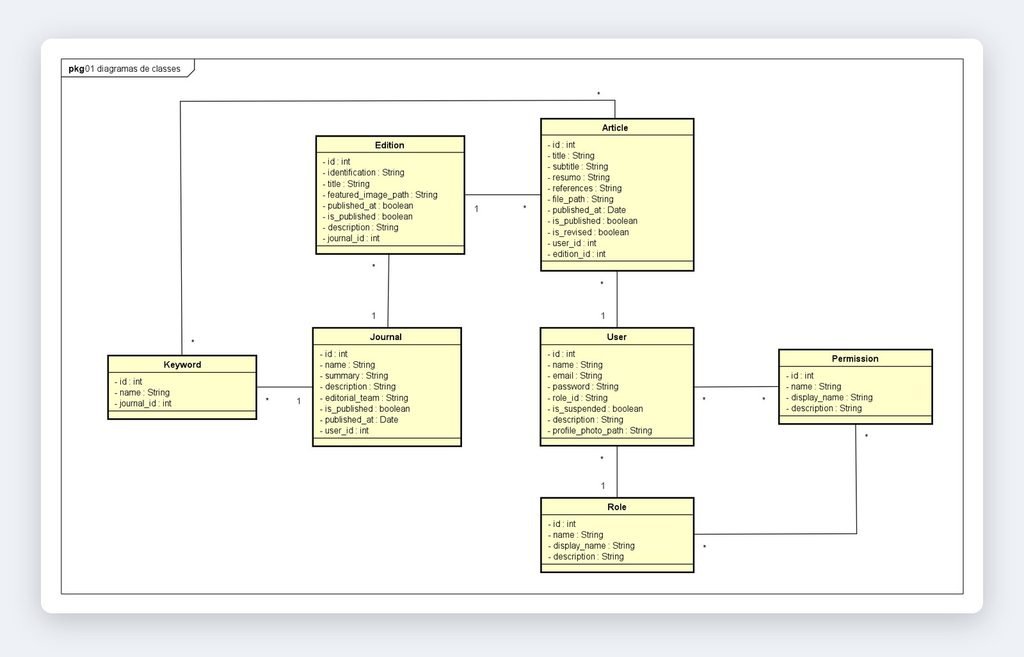
The platform follows the real structure of a scientific journal:
- A journal (for example, “Meio ambiente e biodiversidade”) has many editions.
- Each edition has a volume, number, year, and title, and can be opened or closed for submissions.
- Each article belongs to one edition and carries its title, subtitle, abstract, references, file, and status: pending, approved, or rejected.
- Keywords are registered per journal and attached to articles at submission.
A journal only appears on the public website after at least one of its editions is published. This keeps empty journals away from readers.
4.3 One layout for every page
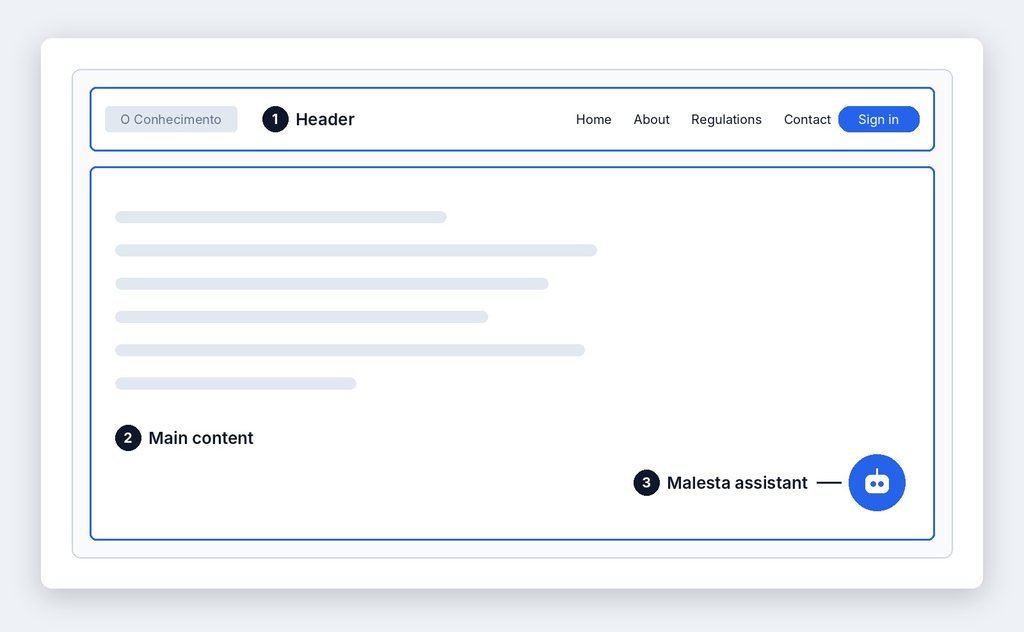
Every page of the website follows the same three-part structure. This consistency matters a lot: once a blind user learns one page, they know them all.
- Header at the top: the site name on the left, the navigation menu on the right (Home, About, Regulations, Contact, Sign in, Register).
- Main content in the middle, which changes from page to page.
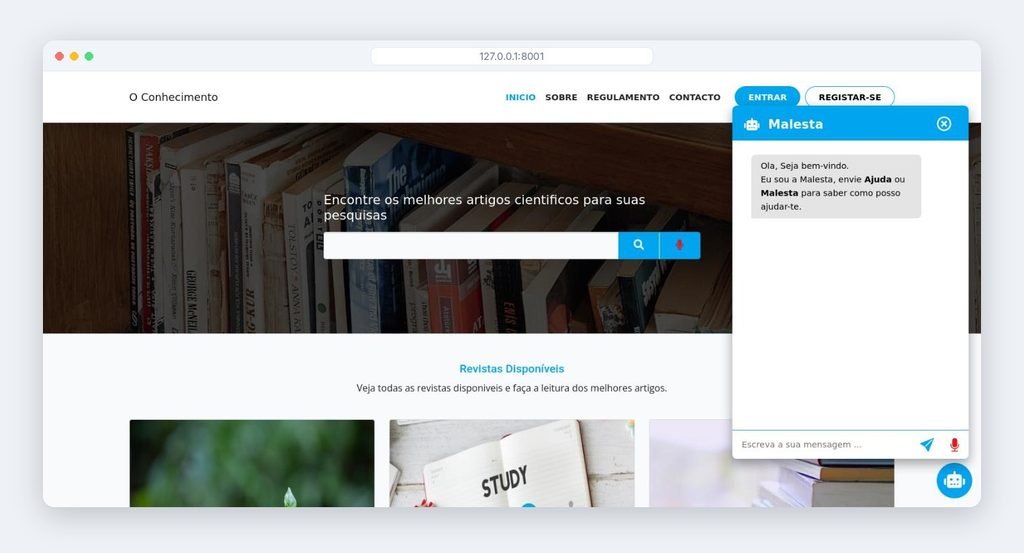
- The assistant in the bottom-right corner, always in the same place.
5. Meet Malesta, the Virtual Assistant
Malesta is the heart of the project. Her job is to give a visually impaired visitor the “glance” that a sighted visitor gets for free: what the site is, which pages it has, and how each page is organised.
5.1 Starting a conversation
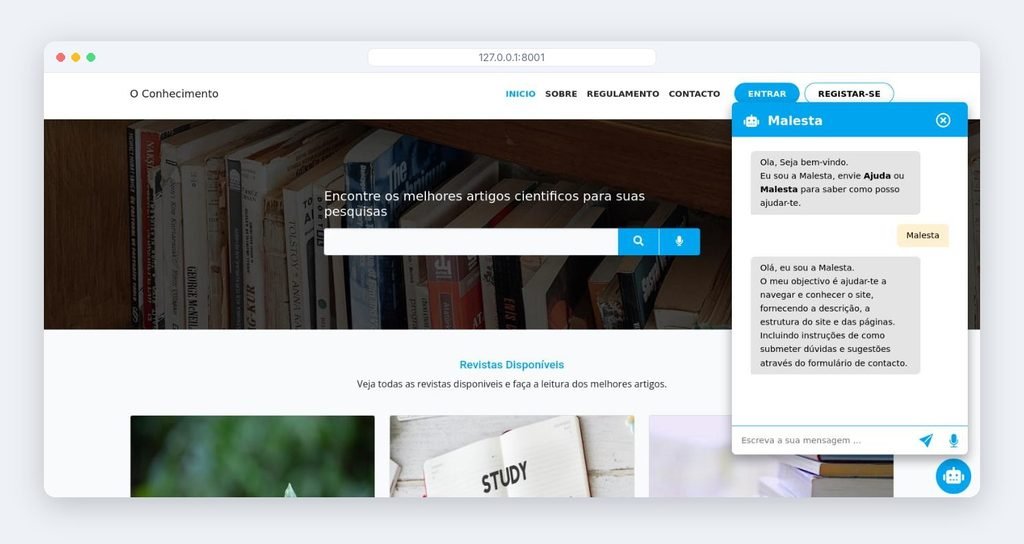
Malesta lives in the bottom-right corner of every page. You can open her with the mouse or, more importantly, with the keyboard:
- CTRL + 1 starts a conversation by voice
- CTRL + 2 starts a conversation by text
When she opens, she greets the visitor and suggests sending “Ajuda” (Help) or “Malesta” to learn what she can do.
5.2 What you can ask her
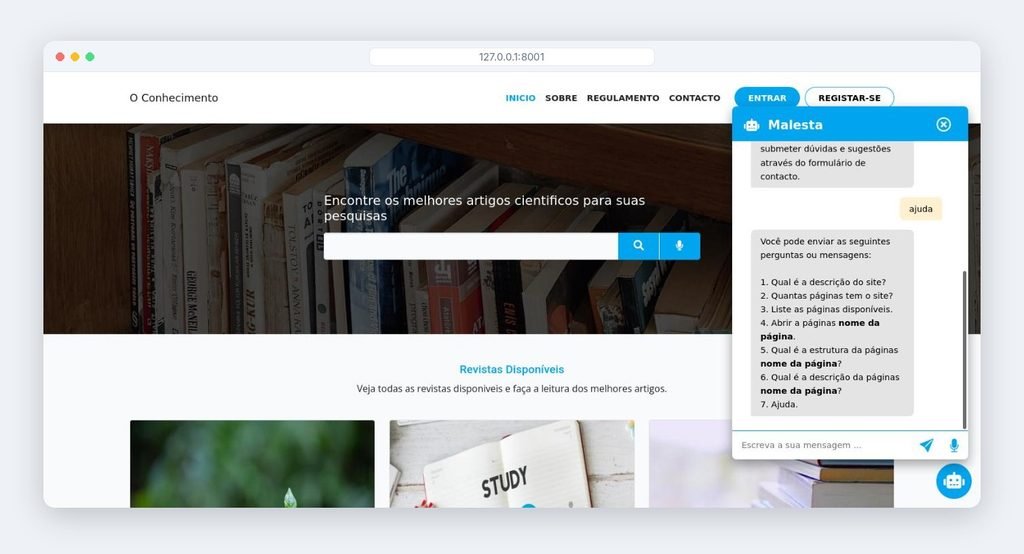
The questions follow the order in which a person discovers a new place:
- What is this site about? Malesta reads the site description.
- How many pages does the site have?
- List the available pages. She answers with links to each page.
- Open the page name. She takes you there.
- What is the description of the page name? Its purpose.
- What is the structure of the page name? How it is laid out.
- Help. The list of everything above.
5.3 A real conversation
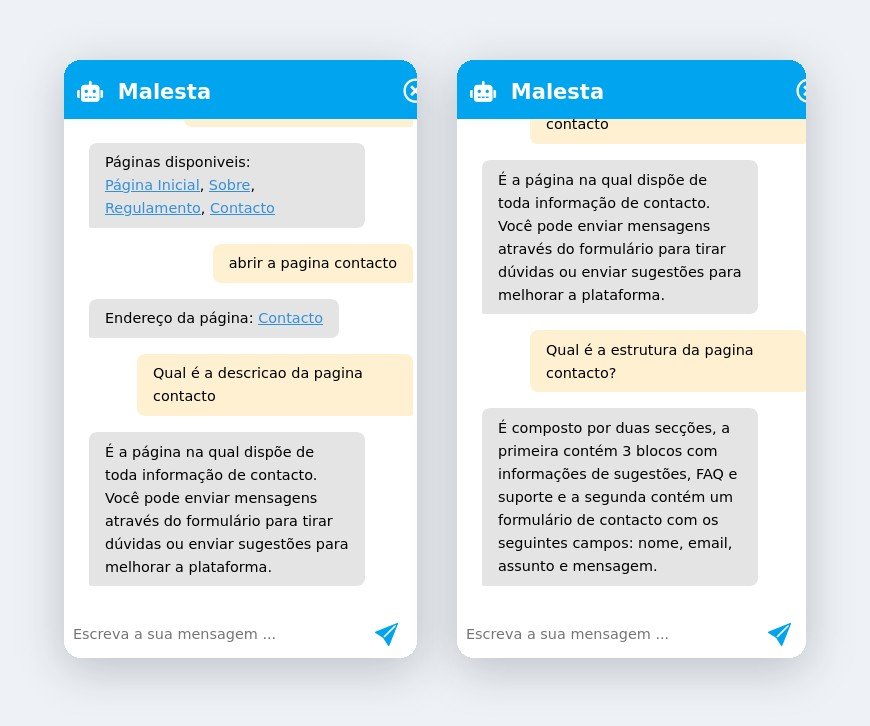
Here is an example taken from the thesis screenshots, on the Contact page:
Visitor: List the available pages.
Malesta: Available pages: Home, About, Regulations, Contact.
Visitor: Open the contact page.
Malesta: Page address: Contact. (The page opens.)
Visitor: What is the structure of the contact page?
Malesta: It has two sections. The first contains three blocks with information about suggestions, FAQ, and support. The second contains a contact form with the fields name, email, subject, and message.
With that last answer, a blind visitor knows exactly what is on the page and where the form is, before reading a single line. That was the goal.
5.4 Who teaches Malesta?
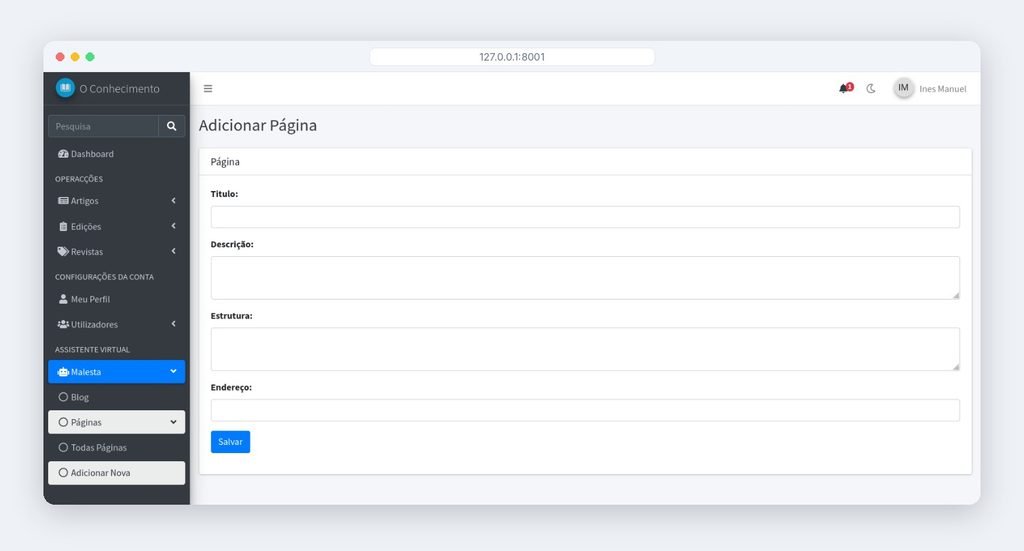
Malesta does not guess. The editors register the information in the control panel, in a section called Malesta:
- Blog: the site’s name, description, and address.
- Pages: for each page, its title, description, structure, and address.
The API then serves these answers to the chat. Because the knowledge lives in the API and not in the website code, the same assistant can be plugged into any other website.
6. Under the Hood: Stack and Methodology
Here is how the platform was built.
6.1 The stack
| Part | Technology | Why |
|---|---|---|
| Platform (back end) | PHP with Laravel (MVC) | Mature, open-source framework for web applications |
| Platform (front end) | JavaScript | Validation before sending data, instant feedback, keyboard interaction |
| Virtual assistant API | Python with Django (MTV) | Clean, separate API that other websites can reuse |
| Database | MySQL | Free, portable relational database supported by both frameworks |
| Voice input and output | webkitSpeechRecognition (Web Speech API) | Runs in the browser, with no paid service |
Two frameworks in two languages, on purpose: the platform consumes the assistant through an API, so each side can evolve on its own.
Why the web, and not a mobile or desktop app? Because a web platform works on any device with a browser and internet access. There is nothing to install, updates happen once on the server, and the user does not need special hardware.
6.2 How the research was done
- Approach: qualitative research, focused on understanding the people involved rather than measuring large samples.
- Data collection: semi-structured interviews (section 2) and bibliographic research, including previous UEM theses on accessibility.
- Modelling: UML in Astah (class, use case, and sequence diagrams) and architecture diagrams in Lucidchart.
- Development: Extreme Programming (XP), an agile method with small frequent releases, continuous feedback, and constant refactoring.
7. Testing: What the Users Said
The platform was tested by five participants in two phases, using a questionnaire. Each participant needed a device with internet access, a microphone, and speakers.
7.1 Phase 1: Publishing, submitting, and reviewing
This phase covered the editorial side: editor-in-chief, editor, and author.
| Question | Result |
|---|---|
| Difficulty managing journals (create, edit, list, delete)? | 40% yes |
| Difficulty managing editions (create, edit, list, delete, publish)? | 20% yes |
| Difficulty reviewing articles (approve or reject)? | 0% yes |
| Difficulty submitting an article? | 40% yes |
| Would recommend the system to a scientific journal? | 80% yes |
Reviewing was the easiest task: nobody had difficulty. Journal management and article submission were harder, with two of the five participants reporting some difficulty. The submission form asks for many fields (journal, edition, title, subtitle, abstract, references, file, keywords), and keywords must be registered beforehand. That is a clear point to simplify.
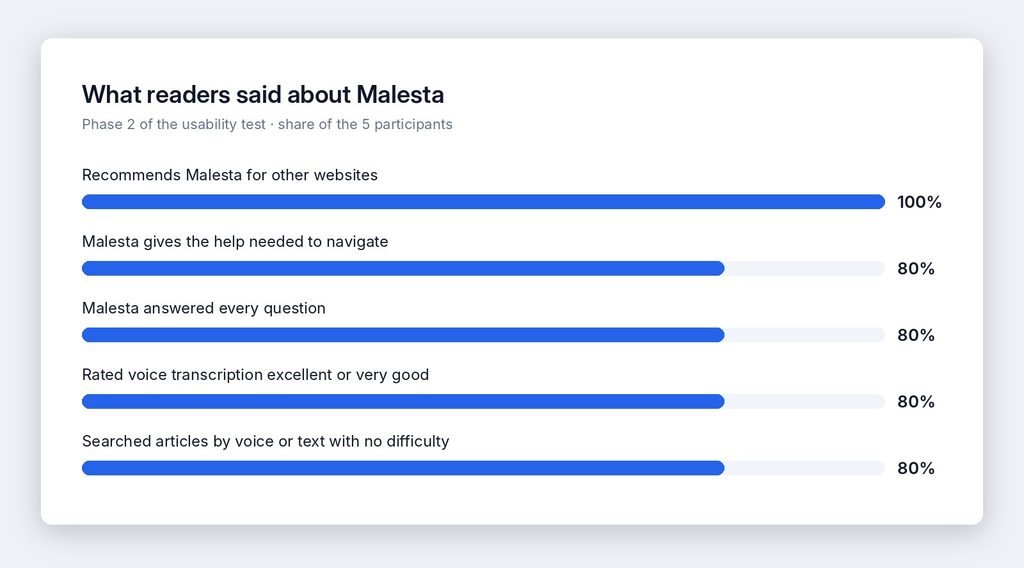
7.2 Phase 2: Reading and talking to Malesta
This phase covered readers, with or without visual impairment.
| Question | Result |
|---|---|
| Difficulty searching articles by voice or text? | 20% yes |
| Does the assistant give a visually impaired person the help needed to navigate? | 80% yes |
| Did the assistant answer every question you sent? | 80% yes |
| Voice-to-text transcription quality | 40% excellent, 40% very good, 20% good |
| Would recommend the assistant for other websites? | 100% yes |
The result I am proudest of is the last one: all five participants would recommend Malesta for other websites, such as sports, entertainment, or health sites. The transcription, even using a free browser feature, was rated “good” or better by everyone.
8. Looking Back from 2026: Limitations and Malesta 2.0
Good results feel nice, but an honest article must also show the weak points. Here they are.
8.1 Limitations I recognised in the thesis
- The platform was not yet tested with visually impaired users. I wrote this in the conclusion of the thesis itself: a test with people who have visual impairments was the essential next step, to discover the barriers that only they would find.
- Five participants is a small sample. The results show a direction, not a statistical proof.
- Browser support for voice. webkitSpeechRecognition does not work in every browser. When it is not available, the voice buttons are disabled and only text works. In the thesis I recommended moving to a cross-browser speech service, such as the speech services from Google Cloud or IBM Watson.
8.2 What I would do differently today
Four years and many projects later, this is what I would change:
- Test with screen-reader users from the first prototype. Not at the end. A short session with a blind user using a real screen reader teaches more than any checklist.
- Generate Malesta’s knowledge instead of typing it. Today, editors register each page’s description and structure by hand, and that text can become outdated when a page changes. A modern version could read the page’s own HTML structure and describe it automatically.
- Start from semantic HTML and ARIA landmarks. Malesta describes the layout, but the HTML itself should also announce it, so the screen reader and the assistant tell the same story.
- Simplify the submission flow. The test results showed that submitting an article was one of the harder tasks. Fewer steps, keywords created during submission, and clearer field labels would help every author, not only those with disabilities.
The core idea still stands: a website should be able to explain itself. Accessibility rules make content readable; a guide like Malesta makes the whole place understandable.
8.3 Malesta 2.0: the assistant I would build today
In 2022, Malesta answered seven fixed questions from text that editors typed by hand. That was enough to prove the idea. With the tools we have in 2026, the same idea can become a real research companion. This is the design I would build today.
1. Understand any page automatically
Instead of a manual “Pages” form, Malesta would read the page itself: its HTML landmarks (header, nav, main, footer), headings, links, forms, and buttons. From that structure it would build a description on the fly. When an editor changes a page, the description changes with it. No more outdated text.
2. Talk naturally, not with fixed commands
The seven commands would be replaced by a language model that understands free questions in Portuguese or English, such as “Where do I send my article?” or “Take me to the latest edition about the environment”. Through tool calling, the model would not invent actions; it would call real functions in our back end:
search_articles(query, journal, year)
open_page(name)
describe_page()
read_section(article_id, section)
download_pdf(article_id)
The model decides which tool to use; our code decides what is allowed to happen.
3. Know the articles, not only the website
This is the big jump. Using Retrieval-Augmented Generation (RAG), every published article would be split into chunks, converted into embeddings, and stored in PostgreSQL with the pgvector extension. A reader could then ask:
- “Find articles about cassava profitability in Mozambique.” Semantic search, not just keyword matching.
- “Summarise the methodology of this article.”
- “What did the authors conclude?”
Every answer would cite the article and section it came from. If the answer is not in the articles, Malesta would say so instead of guessing. For a research platform, that rule is not optional.
4. Turn PDFs into something a screen reader can navigate
PDFs are one of the hardest formats for blind readers: broken reading order, figures with no description, tables read as a soup of numbers. On upload, the platform would convert each article into structured, navigable HTML with real headings, so a user can say “jump to the results”. It would also generate draft descriptions for figures and tables, which editors review and approve before publication.
5. Voice that works in every browser
The browser-only webkitSpeechRecognition would be replaced by server-side speech-to-text using an open-source Whisper-class model, so voice works in any browser and better understands Mozambican Portuguese accents. Answers would be spoken with neural text-to-speech, with adjustable speed, because experienced screen-reader users often listen much faster than the default.
6. Work with screen readers, not against them
Answers would be announced through ARIA live regions, so NVDA, JAWS, VoiceOver, or TalkBack read them automatically. Keyboard shortcuts would be configurable, so they never clash with the user’s screen-reader commands.
7. Designed for our reality
Mobile data in Mozambique is expensive and networks are not always stable. Answers would be streamed and text-first, with small payloads. A phone or WhatsApp channel would also let someone search articles and hear a summary without opening a browser at all.
8. Measured, not assumed
Accessibility checks (with tools like axe-core) would run automatically in the CI pipeline on every deploy. And the real test would happen with blind and low-vision users from the first prototype, measuring task success: can you find an article, open it, and reach its conclusion without help?
Proposed stack: Django or Laravel for the platform, PostgreSQL + pgvector for search, Redis queues for PDF processing and embeddings, a language model with tool calling, Whisper-class speech-to-text, all running in Docker.
Coming soon on this blog: Rebuilding O Conhecimento and Malesta. We will not stop at the theory. In a new series, we will rebuild the platform and the assistant from scratch, step by step, with code you can run on your own machine. The plan:
- The new platform: journals, editions, and articles with accessible HTML from day one
- Turning PDFs into navigable, accessible articles
- Semantic search with embeddings and pgvector
- Malesta 2.0: a language model with tool calling
- Giving Malesta a voice: speech-to-text and text-to-speech
- Testing with real screen-reader users
Which part are you most curious about? Tell me in the comments, and that is where we will start.
9. Conclusion
This thesis started with a scene in a university library and ended with a working platform: O Conhecimento, where scientific articles are published and read, and Malesta, an assistant that describes the website by voice or text to anyone who asks.
Along the way I learned how scientific publishing really works, what WCAG asks of us as developers, and, above all, that accessibility starts with listening to the people who need it. The tests were encouraging: 80% of participants said Malesta gives a visually impaired person the help needed to navigate, and 100% would recommend it for other websites.
In the thesis I also left a recommendation for the Unidade Editorial da Revista Científica da UEM: to include Braille editions of its articles in the future, so that inclusion does not depend on technology alone.
This project is also the root of something you may have noticed on this website: my interest in inclusive technology. Soon we will return to it in code, rebuilding O Conhecimento and Malesta 2.0 together in a new series.
Have you ever tested your own website with a screen reader? Try it today; the result may surprise you. Share your experience in the comments. Your feedback matters and helps make these articles better!
Thank you for reading!
10. Acknowledgements
This work was not built alone. My sincere thanks go to:
- João Metambo, MSc, my supervisor at the Department of Mathematics and Informatics of UEM, for his guidance, patience, and support throughout the project.
- Prof. Doutora Aidate Mussagy and the Unidade Editorial da Revista Científica da UEM, for giving their time to explain how scientific articles are published.
- Prof. José Chilaule, for sharing how a visually impaired person really uses the web. His words shaped Malesta.
- My colleagues and friends who tested the system and gave honest suggestions.
- My family, for their constant support during this journey.
11. Read the Full Thesis
The complete thesis, with all the UML diagrams, the interview guides, the test questionnaire, and the user manual, is available in the UEM institutional repository:
Mabande, M. M. (2022). Plataforma de publicação e consulta de artigos científicos acessível a deficientes visuais — Read the full thesis in the UEM repository
(The thesis is written in Portuguese.)
12. References
ABNT. (2003). NBR 6022: Informação e documentação — Artigo em publicação periódica científica impressa — Apresentação. Associação Brasileira de Normas Técnicas.
Cruz, L. T., Alencar, A. J., & Schmitz, E. A. (2018). Assistentes virtuais inteligentes e chatbots. Brasport.
FAMOD & Data4Change. (2021). Investigação baseada em dados: Quão acessíveis são os websites chaves em Moçambique? https://a11y.co.mz/pt/how-we-exclude/
Instituto Nacional de Estatística. (2017). IV Recenseamento Geral da População e Habitação 2017: Resultados definitivos. http://www.ine.gov.mz/iv-rgph-2017/mocambique
Lakatos, E. M., & Marconi, M. A. (2017). Fundamentos de metodologia científica (8th ed.). Atlas.
Mabande, M. M. (2022). Plataforma de publicação e consulta de artigos científicos acessível a deficientes visuais [Bachelor’s thesis, Universidade Eduardo Mondlane].
Sommerville, I. (2011). Engenharia de software (9th ed.). Pearson Prentice Hall.
W3C. (2018). Web Content Accessibility Guidelines (WCAG) 2.1. World Wide Web Consortium. https://www.w3.org/TR/WCAG21/
World Health Organization. (2019). World report on vision. World Health Organization.