

Hello, dear readers! 👋
Do you remember our task management API from the article Building a RESTful API with Python? Well, today we are going to rebuild it — but this time speaking a completely different language: GraphQL.
And yes, we will be using Python, our programming language friend, together with Django and a library called Graphene.
In the recent article GraphQL vs REST: When to Choose Each, we covered all the theory: why Facebook created GraphQL, the over-fetching problem, the famous single endpoint. Now it is time to get our hands dirty and see all of that working on our own machine.
By the end of this tutorial, you will have a working GraphQL API with Python where the client asks for exactly the data it wants — and you will be able to compare it, file by file, with the REST version we built before. Same project, two philosophies. Sounds fun? Let’s go! 🚀
Index
- What We Are Building
- Setting Up the Environment
- Creating the Task Model
- The Heart of GraphQL: The Schema
- One Endpoint to Rule Them All
- Playing with GraphiQL
- Testing Our API (Like Professionals)
- REST vs GraphQL: Same Project, Side by Side
- Conclusion
- References
1. What We Are Building
Our old friend: a Task Management API. Each task has a title, a description, and a status that can be PENDING, IN_PROGRESS, or DONE.
But here is the twist. In the REST version, we needed serializers, views, and routers spread across multiple files, plus one URL per resource. In the GraphQL version, we will have:
- One single endpoint:
/graphql/ - One schema file where everything lives
- Queries to read tasks (with the client choosing the fields!)
- Mutations to create, update, and delete tasks
- A free interactive playground called GraphiQL
2. Setting Up the Environment
As always, let’s keep things organized with a virtual environment. Open your terminal and type:
mkdir taskmanager_graphql && cd taskmanager_graphql
python -m venv venv
source venv/bin/activate   # On Windows: venv\Scripts\activate
Now, let’s install our ingredients:
pip install django graphene-django
Graphene-Django is the bridge between Django and GraphQL. It knows how to transform our Django models into GraphQL types almost magically — you will see.
Create the project and the app:
django-admin startproject taskmanager_graphql .
python manage.py startapp tasks
Then register both in taskmanager_graphql/settings.py:
INSTALLED_APPS = [
    # ... default Django apps ...
    'django.contrib.staticfiles',
    'graphene_django',   # our new friend
    'tasks',             # our app
]

# Tell Graphene where our schema will live (we will create it soon)
GRAPHENE = {
    "SCHEMA": "tasks.schema.schema",
}
3. Creating the Task Model
Open tasks/models.py. If you followed the REST tutorial, this will look very familiar — and that is exactly the point. Same model, so we can compare both worlds fairly:
from django.db import models

class Task(models.Model):
    """Task model — same structure as our REST tutorial,
    so you can compare both approaches directly."""

    class Status(models.TextChoices):
        PENDING = "PENDING", "Pending"
        IN_PROGRESS = "IN_PROGRESS", "In Progress"
        DONE = "DONE", "Done"

    title = models.CharField(max_length=200)
    description = models.TextField(blank=True)
    status = models.CharField(
        max_length=20,
        choices=Status.choices,
        default=Status.PENDING,
    )
    created_at = models.DateTimeField(auto_now_add=True)
    updated_at = models.DateTimeField(auto_now=True)

    class Meta:
        ordering = ["-created_at"]

    def __str__(self):
        return self.title
Run the migrations:
python manage.py makemigrations tasks
python manage.py migrate
Our database is ready. Now comes the interesting part.
4. The Heart of GraphQL: The Schema
Here is where GraphQL really differs from REST. Remember that in the REST tutorial we created serializers.py, then views.py, then registered routes? In GraphQL, all of that lives in one file: the schema.
Create tasks/schema.py. I will build it piece by piece, and for each piece I will tell you its REST “cousin”, so nothing feels alien.
4.1 The Type (cousin of the Serializer)
import graphene
from graphene_django import DjangoObjectType

from .models import Task


class TaskType(DjangoObjectType):
    class Meta:
        model = Task
        fields = ("id", "title", "description", "status", "created_at", "updated_at")
That’s it. DjangoObjectType looks at our model and generates the GraphQL type automatically. In the REST version, our serializer did a similar job — but here we get a strongly typed contract for free.
4.2 Queries (cousins of the list/retrieve views)
class Query(graphene.ObjectType):
    all_tasks = graphene.List(
        TaskType,
        status=graphene.String(required=False),
        description="Retrieve all tasks, optionally filtered by status.",
    )
    task_by_id = graphene.Field(
        TaskType,
        id=graphene.ID(required=True),
        description="Retrieve a single task by its ID.",
    )

    def resolve_all_tasks(root, info, status=None):
        queryset = Task.objects.all()
        if status:
            queryset = queryset.filter(status=status.upper())
        return queryset

    def resolve_task_by_id(root, info, id):
        try:
            return Task.objects.get(pk=id)
        except Task.DoesNotExist:
            return None
Each field has a resolver — a function that knows how to fetch that data. Notice the small kindness to our users: status.upper() means they can write “pending” or “PENDING”, and both work. Small details make friendly APIs.
4.3 Mutations (cousins of create/update/destroy)
class CreateTask(graphene.Mutation):
    class Arguments:
        title = graphene.String(required=True)
        description = graphene.String(required=False)

    task = graphene.Field(TaskType)
    ok = graphene.Boolean()

    def mutate(root, info, title, description=""):
        task = Task.objects.create(title=title, description=description)
        return CreateTask(task=task, ok=True)


class UpdateTaskStatus(graphene.Mutation):
    class Arguments:
        id = graphene.ID(required=True)
        status = graphene.String(required=True)

    task = graphene.Field(TaskType)
    ok = graphene.Boolean()
    message = graphene.String()

    def mutate(root, info, id, status):
        status = status.upper()
        valid = [choice[0] for choice in Task.Status.choices]
        if status not in valid:
            return UpdateTaskStatus(
                task=None, ok=False,
                message=f"Invalid status. Valid options: {', '.join(valid)}",
            )
        try:
            task = Task.objects.get(pk=id)
        except Task.DoesNotExist:
            return UpdateTaskStatus(task=None, ok=False, message="Task not found.")
        task.status = status
        task.save()
        return UpdateTaskStatus(task=task, ok=True, message="Status updated.")


class DeleteTask(graphene.Mutation):
    class Arguments:
        id = graphene.ID(required=True)

    ok = graphene.Boolean()
    message = graphene.String()

    def mutate(root, info, id):
        deleted, _ = Task.objects.filter(pk=id).delete()
        if deleted:
            return DeleteTask(ok=True, message="Task deleted.")
        return DeleteTask(ok=False, message="Task not found.")


class Mutation(graphene.ObjectType):
    create_task = CreateTask.Field()
    update_task_status = UpdateTaskStatus.Field()
    delete_task = DeleteTask.Field()
Notice the pattern ok + message in our mutations. Instead of throwing scary errors, our API answers politely: “Invalid status. Valid options: PENDING, IN_PROGRESS, DONE”. Your future front-end colleagues will thank you for this. Trust me.
4.4 The Schema (gluing everything together)
At the end of the file:
schema = graphene.Schema(query=Query, mutation=Mutation)
Four concepts: Type → Query → Mutation → Schema. That is the whole GraphQL mental model.
5. One Endpoint to Rule Them All
In the REST tutorial, we registered several routes. Today, open taskmanager_graphql/urls.py and behold:
from django.contrib import admin
from django.urls import path
from django.views.decorators.csrf import csrf_exempt
from graphene_django.views import GraphQLView

urlpatterns = [
    path("admin/", admin.site.urls),
    # ONE single endpoint — this is GraphQL's philosophy in practice
    path("graphql/", csrf_exempt(GraphQLView.as_view(graphiql=True))),
]
One route. That’s all. Everything — reads, writes, deletes — goes through /graphql/. Remember the theory article? This is that “single endpoint” idea, now living in your urls.py.
The graphiql=True parameter gives us a free interactive playground. Let’s meet it.
⚠️ Heads-up:
csrf_exemptandgraphiql=Trueare here to keep the tutorial simple. In production, add authentication, handle CSRF properly, and turn GraphiQL off (or restrict it).
6. Playing with GraphiQL
Start the server:
python manage.py runserver
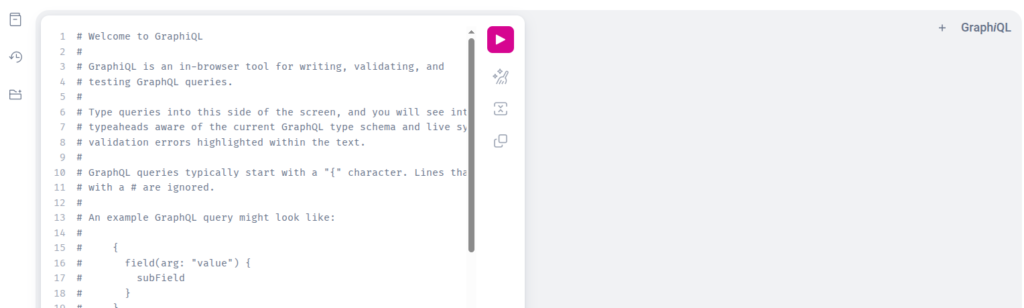
Now open http://127.0.0.1:8000/graphql/ in your browser and say hello to GraphiQL — an interactive editor with auto-completion and documentation, generated automatically from our schema.
6.1 Creating our first task
Paste this in the left panel and press the play button:
mutation {
  createTask(title: "Learn GraphQL", description: "Following the mariomthree tutorial") {
    ok
    task {
      id
      title
      status
    }
  }
}
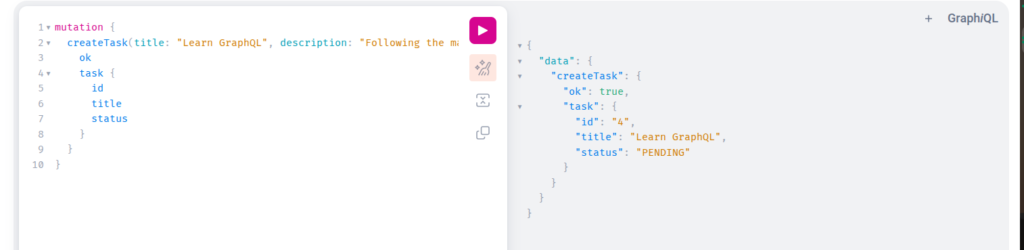
The response confirms: our task was born with status PENDING. Create two or three more — we will need them.
6.2 The magic moment: asking only for what we need
Now, the query that justifies this whole tutorial:
query {
  allTasks {
    title
    status
  }
}
Look carefully at the response. Where is the description? Where is createdAt? They are not there — because we did not ask for them.
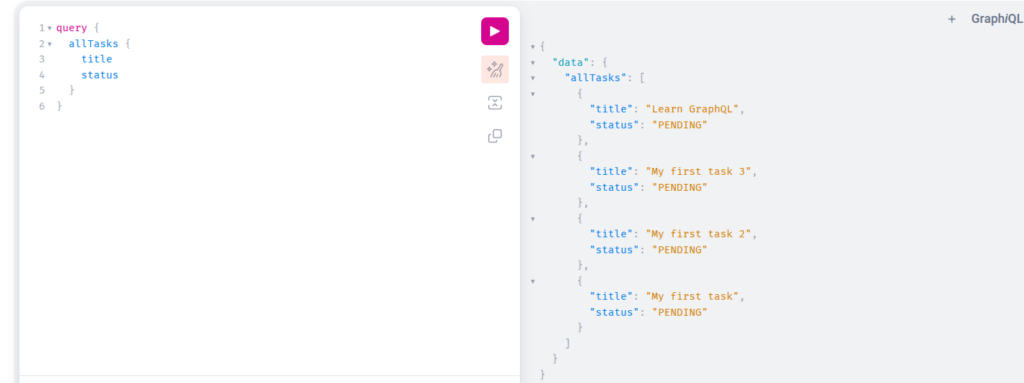
This is the over-fetching problem from our theory article, solved in front of your eyes. In the REST version, GET /api/tasks/ always returned every field of every task. Here, the client is in control. Try adding id to the query and watch the response change instantly.
6.3 Updating and filtering
Change a task status:
mutation {
  updateTaskStatus(id: 1, status: "in_progress") {
    ok
    message
    task { title status }
  }
}
And now try to break it (breaking things is how we learn 😄):
mutation {
  updateTaskStatus(id: 1, status: "flying") {
    ok
    message
  }
}

Our API answers with ok: false and a helpful message listing the valid options. This is the ok + message pattern earning its keep.
Finally, filter tasks by status:
query {
  allTasks(status: "pending") {
    title
    status
  }
}
7. Testing Our API (Like Professionals)
A tutorial that ends without tests is only half a tutorial. Create tasks/tests.py:
import json
from django.test import TestCase, Client
from .models import Task


class GraphQLTaskAPITest(TestCase):
    def setUp(self):
        self.client = Client()
        self.task = Task.objects.create(title="Test task", description="A test")

    def query(self, q):
        response = self.client.post(
            "/graphql/", data=json.dumps({"query": q}),
            content_type="application/json",
        )
        return json.loads(response.content)

    def test_query_all_tasks(self):
        data = self.query("{ allTasks { title status } }")
        self.assertEqual(data["data"]["allTasks"][0]["title"], "Test task")

    def test_create_task_mutation(self):
        data = self.query('''
            mutation { createTask(title: "New task") { ok task { title } } }
        ''')
        self.assertTrue(data["data"]["createTask"]["ok"])
        self.assertEqual(Task.objects.count(), 2)

    def test_invalid_status_returns_error_message(self):
        data = self.query(f'''
            mutation {{ updateTaskStatus(id: {self.task.id}, status: "flying") {{ ok message }} }}
        ''')
        self.assertFalse(data["data"]["updateTaskStatus"]["ok"])
        self.assertIn("Invalid status", data["data"]["updateTaskStatus"]["message"])

    def test_client_chooses_fields(self):
        """The core GraphQL promise: response contains ONLY requested fields."""
        data = self.query("{ allTasks { title } }")
        task = data["data"]["allTasks"][0]
        self.assertIn("title", task)
        self.assertNotIn("description", task)
My favorite is the last one: test_client_chooses_fields. It literally proves, in code, the promise that brought us here. Run everything:
python manage.py test
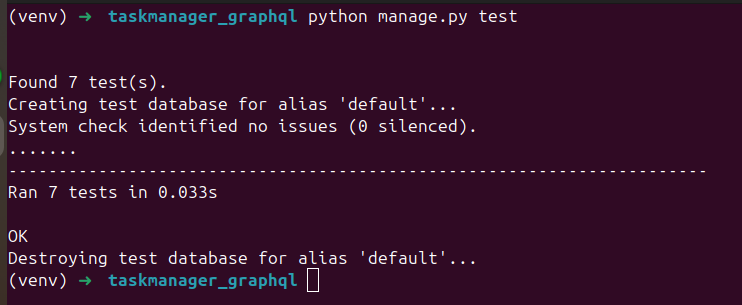
All green. Beautiful. ✅
(The code above has 4 tests. In the GitHub repository you will find the complete test suite with 7 tests, including updates, deletes, and filtering — so if you run the repository, you will see 7.)
8. REST vs GraphQL: Same Project, Side by Side
Since we built the exact same project twice, we earned the right to a fair comparison:
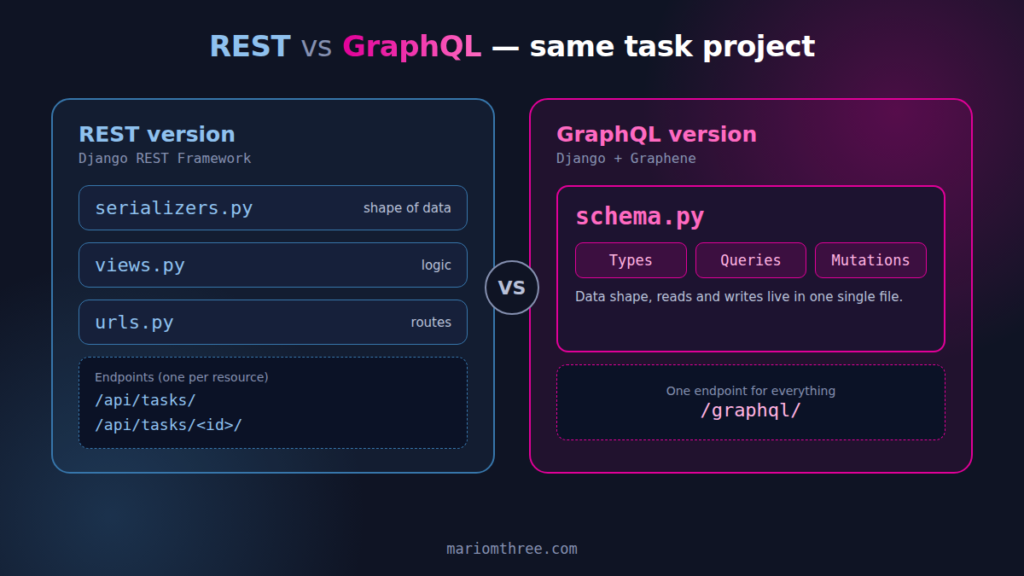
| Aspect | REST version (DRF) | GraphQL version (Graphene) |
|---|---|---|
| Endpoints | /api/tasks/, /api/tasks/<id>/ | /graphql/ only |
| Code organization | serializers.py + views.py + urls.py | One schema.py |
| Response shape | Fixed (all fields, always) | Client chooses the fields |
| Interactive docs | Swagger (needed setup) | GraphiQL (came for free) |
| Testing tool | Postman / Swagger | GraphiQL in the browser |
| Learning curve | Familiar territory | New concepts (types, resolvers, mutations) |
My honest opinion after building both? For a small CRUD like this one, REST is simpler and perfectly fine — exactly as we concluded in the theory article. But now you have felt the difference in your fingers, and when a project with multiple clients and interconnected data appears in your life, you will know precisely which tool to reach for.
9. Conclusion
Today we rebuilt our task management API in GraphQL and, along the way, we saw the theory from the previous article come alive: the single endpoint, the client choosing fields, the auto-generated documentation, and friendly error handling with the ok + message pattern.
The complete project, with all 7 tests, is on my GitHub: https://github.com/mariomthree/task-management-graphql-api
Feel free to clone it, break it, improve it — and leave a star if it helped you! ⭐
Your thoughts matter! Did you prefer building this in REST or in GraphQL? Share your experience in the comments — and if something did not work on your machine, tell me and we will debug it together.
Thank you for reading, and see you in the next article! 👋
10. References
Django Software Foundation. (2026). Django documentation. https://docs.djangoproject.com/
Graphene Community. (2026). Graphene-Django documentation. https://docs.graphene-python.org/projects/django/
GraphQL Foundation. (2024). GraphQL documentation. https://graphql.org/
Mabande, M. M. (2025, September 9). Building a RESTful API with Python: Creating a simple task management. MarioM3. https://mariomthree.com/building-a-restful-api-with-python-creating-a-simple-task-management/
Mabande, M. M. (2026, July 20). GraphQL vs REST: When to choose each one. MarioM3. https://mariomthree.com/graphql-vs-rest/